A Panel PC (All-in-One) is usually less expensive than a separate monitor + BOX PC setup. So why are both solutions still widely used in practice?
In many projects, the decision between a Panel PC and a monitor + BOX PC setup is made primarily at the purchasing stage. The problem is that the real consequences of this choice often become apparent only later — usually when a failure occurs. That is when it turns out that replacing a single component may take only a few minutes, while in another setup the entire workstation may be out of service for several hours, with the cost of downtime quickly exceeding the initial difference in hardware price.
That is why this is not simply a matter of choosing the right device. It is a decision that determines how the system will respond in the event of a failure or unexpected disruption.
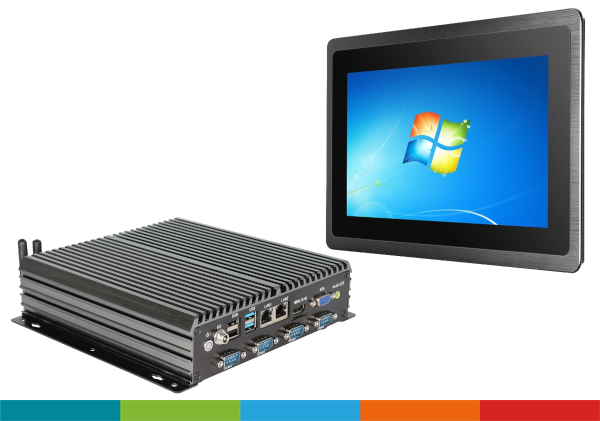
In applications where a touchscreen is used intensively on a daily basis, damage to the display or touch panel is relatively common. Replacing the monitor alone is simpler, less expensive and faster. There is no need to configure the operating system again — the technician simply removes the monitor from the enclosure, disconnects the cables, replaces it with a new unit, reconnects it and mounts it back in place.
This applies both to factory environments and applications such as smart vending systems or RVMs. Replacing a complete Panel PC, on the other hand, may require installing the operating system in advance, travelling to the site, removing and installing the device, restarting the system and configuring it again. This naturally takes more time.
In practice, we encounter situations where replacing a damaged display takes only a few minutes, whereas with an integrated solution the downtime may last several hours — or even days if a replacement unit is not available in stock.
For maintenance departments, response time is critical. A failed component needs to be replaced quickly so that the machine or production process can return to operation as soon as possible.
This is why monitor + BOX PC configurations are often used in such environments instead of Panel PCs. Of course, in applications where installation space is limited, a Panel PC may be the better option, as its compact design is one of its key advantages.
This is not the only scenario in which a monitor + BOX PC setup can offer an advantage. In practice, the main issue is often not the display itself, but spare-part availability and service response time.
In many manufacturing facilities, every hour of downtime results in a measurable financial loss. Maintenance teams therefore do not necessarily wait for the “perfect solution” — their priority is restoring operation as quickly as possible.
With this approach:
This makes it possible to keep a spare monitor in stock and replace it within minutes, without interfering with the operating system, configuration or stored data.
On the other hand, this approach also has certain limitations that are often overlooked during the design stage.
A monitor + BOX PC configuration means:
And this is where problems may arise in many projects: the system works correctly at first, but over time various intermittent or difficult-to-diagnose issues begin to appear.
With an industrial All-in-One Panel PC:
For this reason, in applications where:
a Panel PC may prove to be the more reliable solution in the long term.
Where fast replacement and low servicing costs are the main priorities, a monitor + BOX PC configuration is often the better fit. Typical examples include:
Where compact design, reliability and simple installation are the main priorities, Panel PCs are more commonly used. Typical examples include:
Self-service machines, such as return systems for beverage containers or parcel drop-off and collection terminals, are a good example. In these applications:
For this reason, separate monitor + BOX PC configurations are often used in such applications. If the display fails, a service technician or trained employee can quickly replace the screen itself while leaving the computer and system configuration unchanged.
This reduces service time and minimizes disruption to the operation of the system.
In industrial environments, the situation is often very different. In machinery and production lines:
In such cases, using a separate monitor and computer means additional cabling and greater installation complexity. This is why All-in-One Panel PCs are often preferred: they take up less space, simplify installation and reduce the number of potential points of failure.
There is one more factor that often becomes apparent only after the system has been operating for some time: Total Cost of Ownership (TCO), rather than the purchase price alone.
At first glance, a Panel PC may seem less expensive:
The difference is relatively small, and in many cases the initial purchase price is not the deciding factor.
What matters much more is what happens after several months of operation. If, in a particular application:
then the cost of a single failure — including service time and downtime — can very quickly outweigh the initial difference in hardware cost.
As a result, a solution that is more expensive to purchase may turn out to be less expensive to maintain — or the opposite may be true.
In practice, choosing between a Panel PC and a monitor + BOX PC setup is rarely just a technological decision. It is primarily a question of which factor presents the greater risk in a particular application: equipment failure or the time required to replace the failed component.
In many projects, this single distinction ultimately determines which architecture is the better fit for the application.
If you are currently selecting a solution and are not sure which option will work better in your application, it is worth analysing the specific operating conditions.
A good approach is to consider not only the technical specifications, but also how the system will be used and serviced.
Already at the concept stage, it is possible to determine:
In many cases, just a few pieces of information — such as the operating environment, usage pattern and service access — are enough to determine which approach is likely to be more reliable and cost-effective in the long term.
Necesa is a JM elektronik brand created to provide solutions that are essential in modern industrial environments. Its portfolio includes a complete range of industrial devices: fanless Panel PCs, embedded BOX PCs, SBC single-board computers, industrial monitors and advanced rugged tablets.
All devices combine a durable, modern design with consistent styling and are designed for easy integration with existing automation, HMI and IoT systems.
We will be happy to help you select the right solution for your application. Contact us at iit[at]jm.pl or use the contact form below.