Selecting an industrial computer very often starts with the basic specifications: which processor, how much RAM, what type of storage and how many I/O ports are required. These are important parameters, but on their own they do not answer the most important question: will the computer operate reliably under actual working conditions?
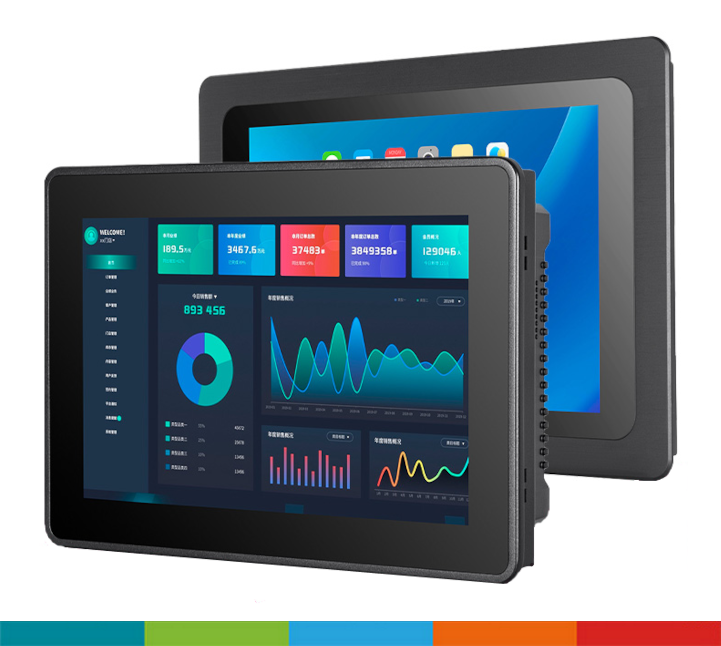
Problems often appear only after deployment. The system begins to freeze, the computer restarts unexpectedly, the device stops responding under certain conditions, or the first hardware issues appear after several months of operation.
In such situations, insufficient computing performance is not necessarily the cause. Very often, the issue is that the All-in-One computer has not been properly matched to the working environment, mounting method, power supply, application or way in which it is used.
That is why selecting an industrial computer requires looking beyond the specification sheet.
The first question should not be “how powerful does the computer need to be?” but rather “under what conditions will it operate?”. On paper, two devices may look very similar. In a real application, however, the differences between them may determine their durability and operational stability.
One of the most common issues is the temperature inside the control cabinet.
For example, a computer may operate in a production hall where the ambient temperature is around 30–35°C. This does not mean, however, that the temperature inside a closed cabinet will be the same. Limited ventilation and heat generated by other devices can cause the temperature inside the enclosure to rise significantly.
In practice, there are situations where the temperature inside a cabinet exceeds 60°C after several hours of operation. Long-term operation under such conditions affects component lifespan and may increase the risk of unstable performance.
For this reason, the actual operating temperature range should be taken into account when selecting a device — not only the ambient temperature, but also the conditions at the installation point.
Dust and airborne contaminants can also be a problem on production floors. Depending on the environment, they may accumulate on the device surface, in ventilation openings and around connectors.
In such applications, a fanless computer can be a good solution, together with appropriate protection of unused ports. Covers for USB, RJ45, HDMI or VGA connectors help reduce the ingress of contaminants into unused interfaces.
If the device is installed in an area exposed to moisture, splashes or liquid spray, the appropriate IP protection rating becomes important.
Insufficient protection can lead to equipment failure and, as a result, costly downtime. The enclosure material also matters — in some environments, an unsuitable material may be susceptible to corrosion.
For machinery, vehicles, forklifts and other mobile applications, vibration and shock must also be considered.
In such conditions, not only the enclosure itself matters, but also the internal components, mounting method, industrial storage device and the way connections are secured.
Before selecting a device, it is therefore worth defining the actual temperature range, dust and humidity levels, required IP rating, and resistance to vibration and shock. It is also important to verify whether the cooling method will be suitable for the intended installation environment.
A Panel PC should be selected for the environment in which it will operate, not only for the requirements of the application itself.
Another common problem appears during integration. At the purchasing stage, the dimensions of the device may seem suitable. Only during installation does it become clear that there is not enough space in the cabinet, cables are difficult to route, or access to the device is inconvenient.
The problem may be caused by a computer that is too large for the available space, but also by insufficient room for cabling or additional system components.
The mounting method is equally important. Depending on the application, a computer or Panel PC can be installed from the front or rear of the enclosure, mounted using VESA, a Yoke bracket or a DIN rail.
The mounting method should therefore be part of the device selection process, rather than a decision made only at the installation stage.
Serviceability is equally important. If replacing the computer requires removing half of the devices installed in the cabinet, even a simple failure may result in extended downtime.
For this reason, already at the design stage it is worth checking how much space will be required for both the device and its cabling, how it will be mounted and whether convenient service access will remain after installation.
It is also important to ensure that the computer is compatible with the available power supply and will operate reliably under the conditions present in the application.
A properly selected computer should not only work correctly — it should also be easy to install and service.
A natural tendency when selecting a computer is to choose a more powerful processor “just in case.” This does not always make sense.
Many HMI applications, operator terminals and simple production systems do not require significant computing power. In such cases, selecting a much more powerful processor may only increase the cost of the device and its power consumption unnecessarily.
On the other hand, an underpowered computer can cause delays, application freezes and problems when the system is expanded.
For this reason, the processor and RAM should primarily be matched to:
For example, a simple All-in-One computer used mainly for logging data or operating a basic interface may not require the same level of performance as a Panel PC running advanced visualisation, data analysis or several applications at the same time.
Depending on the application, processors from different performance segments can therefore be considered — from energy-efficient Celeron-class units through i3 and i5 to more powerful configurations such as i7.
However, the processor should not be selected based solely on the name or general category of the application. The final configuration should reflect its actual requirements.
The opposite mistake is selecting the lowest possible configuration purely to reduce the purchase price.
At first, the system may operate without any issues. Over time, however, response times may increase, applications may begin to freeze and available resources may become insufficient after the system is expanded or additional functions are introduced.
Savings made at the purchasing stage can therefore quickly turn into additional operating costs.
Industrial projects most commonly use solutions based on x86 architecture, but this does not mean that x86 is always the best choice.
ARM platforms can offer low power consumption, an attractive price and sufficient performance for many dedicated applications. Depending on the platform, operating systems such as Linux or Android may also be available.
ARM is therefore worth considering particularly when the application does not require software available exclusively for x86 architecture, and factors such as low power consumption, compact design or cost are important.
x86 architecture remains very popular in automation and industrial systems primarily because of its broad compatibility. It supports widely used operating systems such as Windows and Linux, as well as a large ecosystem of industrial software.
In many existing installations, it also simplifies integration with software and infrastructure that are already in use.
The choice between ARM and x86 should therefore be based primarily on application requirements, software compatibility, available interfaces and the intended use of the device.
When selecting a Panel PC, most attention is often paid to the computer inside the enclosure. From the operator's perspective, however, the display may be the most important element.
It is the component the user interacts with directly, and its parameters determine whether operating the system will be comfortable and efficient.
One of the basic parameters is brightness. Insufficient brightness may become a problem in brightly lit production halls or wherever direct light falls on the screen. If the operator cannot read information quickly, the system begins to make work more difficult instead of easier.
If the Panel PC is intended to be operated by touch, it is worth considering who will use it, how it will be used and what the operator will use to interact with it. Will the user operate the screen with a bare hand, gloves or a stylus? Does the touchscreen need to respond reliably under specific environmental conditions?
Depending on the application, different touch technologies can be considered, including capacitive and resistive touchscreens. The right choice can have a significant impact on operator comfort, especially if the device is used for many hours every day.
Mechanical resistance should not be overlooked either. A panel installed directly at the operator workstation is more exposed to accidental impact, pressure and contact with tools or other objects.
For demanding applications, thicker glass or vandal-resistant solutions may therefore be considered where there is a higher risk of mechanical damage to the display.
A Panel PC should therefore be selected not only according to what is inside the enclosure, but also according to how people will interact with the device.
Finally, it is worth looking at the entire project from the perspective of Total Cost of Ownership (TCO).
In many projects, purchasing decisions are based primarily on the price of the device and its technical specification. The real problem appears later — during a failure, service intervention, downtime or device replacement.
The price difference between two computers may be several hundred or even several thousand PLN. A single failure, however, may generate a much greater cost.
If a production line manufactures products worth tens of thousands of PLN per hour, even a relatively minor computer failure can stop the entire process.
That is why, when selecting a device, it is worth asking not only: “How much does this computer cost?” but also: “How much will its failure cost?”
For this reason, a device that is better matched to the actual operating conditions may prove more cost-effective in many projects, even if its initial purchase price is higher.
Selecting an industrial computer should begin with analysing the entire application rather than comparing processor tables.
The first step should be to determine where the device will operate and under what conditions. It is also important to establish who will use it and how, how it will be mounted, and what service or replacement procedures may look like.
The next step should be to define the software that will run on the device and its actual performance requirements. It is also worth considering the planned future development of the system so that the selected configuration does not become insufficient after only a few years.
Finally, the project should be analysed from a cost perspective. If a computer failure can stop production, the price difference between devices should be considered in the context of potential downtime, service and replacement costs.
This approach helps avoid a situation in which a computer meets all requirements on paper, but after deployment turns out to be poorly matched to the actual operating environment.
A good All-in-One computer is not necessarily the one with the most powerful processor, the most RAM or the lowest price. It is the device that is properly matched to a specific application — its environment, users, mounting method and system requirements.
If you are currently selecting an industrial computer or designing a system, it is worth analysing these aspects before making a purchase. Based on the application requirements, it is then possible to select a solution that is not only technically suitable, but also reliable and cost-effective in the long term.
We have previously discussed how to choose the right solution for kiosks, car washes, EV charging and self-service systems and when to choose a Panel PC and when to choose a monitor + BOX PC.
If you are working on a specific application, we can help you select a solution that takes into account not only the technical specifications, but also the actual operating conditions and application requirements.
Contact us at iit[at]jm.pl or use the contact form below.